
Can-AI-replace-tools-like-Asana-I-spent-15-minutes.jpeg

Can AI replace tools like Asana? I spent 15 minutes building an app to find out.

Just 15 minutes, from concept to publish. That’s how long it took for me to create a basic version of a work management tool like Asana without writing a single line of code.

The idea struck me one weekday when I asked my team: “What annoys you most about our workflow? What’s the one thing you want me to change?”

One pain point came up: They weren’t a huge fan of the Google Doc I’d been using to track our long-term reporting. So, I thought: I have 15 minutes for a coffee break. Let me see how far I get using vibe coding — the concept of using prompts to create software with AI — on Base44, an app-building platform.

While my dashboard app has far fewer features than Asana, the results impressed me. And it taught me an important lesson about the “SaaSpocalypse,” the idea that AI can create products for free that work as well as software products companies would usually sell. Those fears have battered software stocks, with Asana down about 54% this year, and Atlassian, the company behind project management app Trello, down about 59%.

An Asana spokesperson told Business Insider that a productivity dashboard is “a small piece of what companies need to run work effectively, at scale.” They added that Asana’s tools help coordinate work across “many teams and large departments” — including between humans and AI agents.

My project also gave me other reasons why AI may not mean game over for productivity software companies.

From prompt to publish in minutes

I’ve used a range of productivity tools, from Notion to Monday.com and Asana. I find all of them useful, particularly Notion’s high level of customizability and Asana’s flexibility for collaborative teamwork.

They gave me a good idea of what I wanted, so I started off with a simple prompt:

I want to vibe code a slick dashboard for a small team of reporters at Business Insider. I want it to be a slate for enterprise reporting, allowing each user to input their stories to a common dashboard. I also want functionality that lets a user drag and drop entries into a publishing calendar, with daily/weekly/monthly/yearly view toggles.

I plopped this prompt into ChatGPT and asked it to generate a detailed prompt for Base44 and Lovable. These are two of many one-stop shops on the market that let users build and launch the app directly on their platform.

ChatGPT gave me tailor-made prompts for each platform. I refined the prompts by asking for more functionality, then prompted ChatGPT to troubleshoot in advance if the instructions might create any issues on the Lovable and Base44 backends.

After five minutes of planning, I had my detailed prompts locked and loaded.

10 minutes to build

This wasn’t my first time using Base44 or Lovable. I’d used vibe-coding platforms to try to code other apps, including one for tracking collectible cards, so there wasn’t the same learning curve as a newcomer.

It was extremely easy to get started. All I did was plug my ChatGPT-generated prompt into both platforms. I walked away for five minutes as the platforms’ chatbots “thought” their way through my request, figuring out how best to execute it.

When I returned to my laptop with a warm mug of tea, I had two complete prototypes generated on both apps.

I dedicated 5 minutes to ensuring the app was secure, adding login and authorization permissions for each reporter and editor. That’s something that’s baked into off-the-shelf apps like Asana, and security has caused headaches for other apps built with AI. I also got picky about customizing the dashboard’s aesthetics, and spent a minute or so changing the font types and colors on each platform.

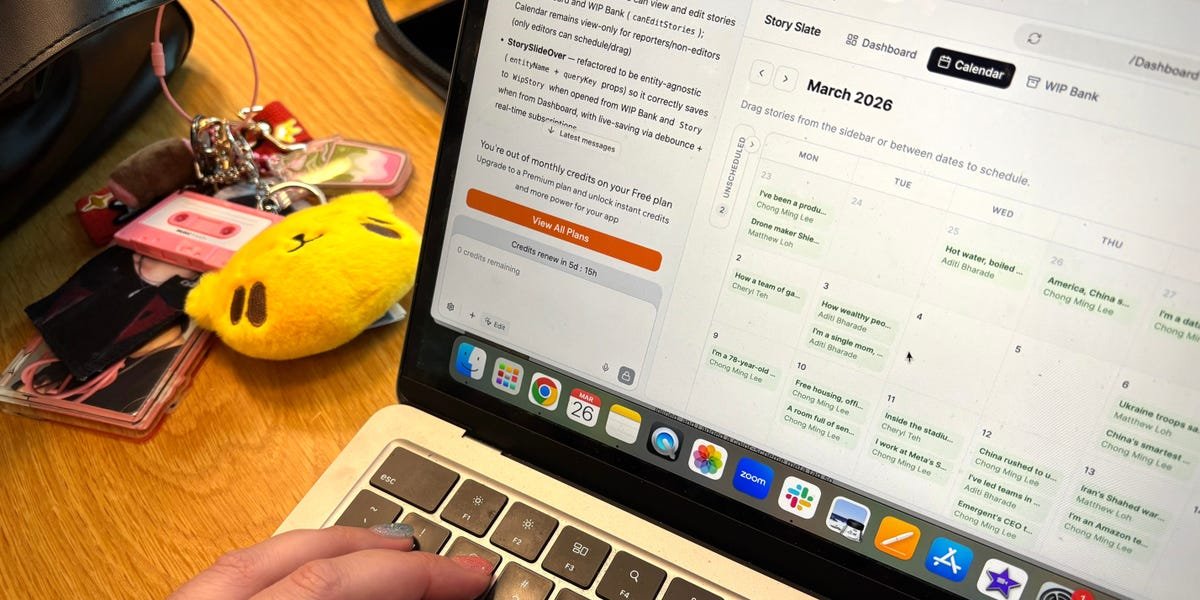
It was important that the app allowed me to sort projects by progress and see at a glance all the work each reporter had on their plate. I also wanted a broad calendar view to see which stories I was planning to publish in the next month. And I wanted a repository of works-in-progress.


A screenshot of Cheryl Teh's newsroom dashboard on Base44.

It was important to me that the app had tabs for a dashboard, a calendar view, and a section for works in progress. 

Cheryl Teh


It was also essential that the app include tabs for a dashboard, a calendar view, and a section for works in progress.

I also asked the vibe-coding apps to make sure all the dashboard data could be downloadable in one click, so my writers have fast, easy access to their complete story slate.

After some back-and-forth prompting, I got all of these features — but I did burn through all my free credits on Lovable before getting the app ready to use. But in under 15 minutes and within the free credit limit, my Base44 dashboard for drafts was ready for launch.

The hype train for vibe coding is real

I’m no coding wizard. I have distinct and embarrassing memories from college of having a minor crisis trying to build a website on Dreamweaver and struggling to build a codebase for my master’s thesis. As I see it, vibe coding has opened the door wide for nontechnical people like me to build the bones of simple applications in a short time.


Lee Chong Ming, Cheryl Teh, and Aditi Bharade.

My team and I vibe-coded apps on various platforms to see how the products stack. 

Amanda Goh


My team and I recently vibe-coded apps on various platforms as an experiment to see how the products stack. We built several apps — including a thumbnail composite-maker, a writing companion, and an AI-powered photo critic. In most cases, we got these apps to a usable state in under 30 minutes.

Those experiences make it easy to see why AI is such a problem for software companies like Asana. In an interview with Business Insider’s Alistair Barr, Asana’s CEO, Dan Rogers, acknowledged the existential threat that companies like his face. He said this threat also presents a new opportunity for Asana: to go all in on coordinating a workforce in which humans need to work hand in hand with AI.

I’m also hesitant to write these firms off. For many users, Asana’s links to email, Slack, and apps like Canva and Zoom remain valuable. That infrastructure, plus things like cybersecurity, is typically baked into off-the-shelf software and lacking in vibe-coded projects. And, obviously, my dashboard doesn’t have the capability to track AI agents and their workflows, as Asana plans to do.

“Orchestrating humans and AI is an incredibly complex thing to do — and that complexity is underscored by the fact that many AI-native startups and foundational model providers use Asana to run their own work,” the Asana spokesperson said.

Since I made the tool in March, my team’s been using it every day, and it’s front-and-center during team pow-wows and at our 1:1s. It’s safe to say my vibe-coded app meets my basic workflow needs — and for free.



Source link

Amanda Krause headshot

I spent $61,000 building a personal pub in my backyard. There are 3 mistakes I wish I hadn’t made.

This as-told-to essay is based on a conversation with Stephen Hutyra, a 42-year-old program analyst living in the small town of West, Texas. It’s been edited for length and clarity.

In November 2020, I was inspired to build a pub in my backyard after seeing a Facebook post.

We have a saying that everything is bigger and better in Texas, so I wanted our pub to be bigger and better than the one I saw in the pictures online.

I spent three years and $61,000 building the space we call The Thirsty Goat on half an acre of land. A construction team built the structure, and I finished the work with my family’s help.

My family, friends, and I find ourselves sitting out here in the middle of the week until midnight, or until 2 or 3 a.m. on the weekends. We’ve thoroughly enjoyed it since finishing back in August, but we’re only just starting to see how much we’ll use it.

Still, there are a few things I wish I’d done differently.


Inside the pub Stephen Hutyra built in his backyard.

Inside The Thirsty Goat pub.

Stephen Hutyra


I should’ve connected a hot-water heater

The main mistake I made is something that my wife reminds me of all the time: I didn’t hook up hot water to the bathroom or the bar.

There’s only cold water coming out of both sinks.

I didn’t think I’d have the space for a hot-water heater, but I probably could have gotten one of those little tankless ones and put it on the outside.

It wouldn’t have taken much to add that on, and it’s been very cold washing hands and dishes in the winter, so I regret not doing that.


The bathroom inside Stephen Hutyra's backyard pub.

The bathroom inside The Thirsty Goat.

Stephen Hutyra


Unfortunately, I didn’t install a dishwasher either

It’s another thing my wife reminds me of all the time. I should have planned to install a small dishwasher below the cabinet that sits behind the bar.

I either have to wash dishes with cold water in the bar sink or load dirty glassware into a tub I haul into the house to wash in the dishwasher.

Having a dishwasher would really come in handy to load dirty dishes and cutlery throughout the day and night. But with the compact floor plan I mapped out, I just didn’t have the room.


The cabinets and sink in Stephen Hutyra's backyard pub.

The countertop area of the pub.

Stephen Hutyra


A little extra space behind the bar would have been nice

Initially, I only planned to put one mini fridge behind the bar. After I installed it, though, I measured the space left and realized I had enough room for a second fridge.

Having two has really made a big impact. I frequently use the second to store juices, lemons, limes, and other items for mixed drinks.

If I didn’t have the fridge, I’d probably have to use a small cooler with ice packs.

What I didn’t realize, though, is that because the countertop edge extends into that corner, the door to the second mini fridge can only open about halfway.

If I had installed shelves there as I initially planned, there wouldn’t be an issue.


The two mini fridges inside Stephen Hutyra's backyard pub.

The second fridge behind the bar can’t fully open.

Stephen Hutyra


Thankfully, there’s room for other appliances on top.

A microwave, coffee maker, and ice maker have taken about 40% of the empty counter space I had built behind the bar. The ice machine saves space, the microwave is good for guests to quickly reheat items, and adding Keurig single-serve coffee has been nice as well.

We no longer have to walk back into the house to make a cup of coffee in the mornings when we’re enjoying the pub.

I’ve had to adjust to a smaller workspace, but it’s worked out.


Source link

Im-an-Amazon-tech-lead-who-got-promoted-by-building.jpeg

I’m an Amazon tech lead who got promoted by building AI products. Here are my top vibe coding tips.

This as-told-to essay is based on a conversation with Anni Chen, who has worked in Amazon software engineering for about three-and-a-half years. It has been edited for length and clarity. Business Insider has verified her employment history.

AI helped me code, but more importantly, it helped with turning it into products. It’s the combination of grasping AI and translating it into scalable products that helped me get promoted faster.

I started off as a Software Engineer I, an entry-level role, in 2022. I was in the recommendations team working on serving recommendation widgets.

About two years ago, I started working on AI products on the side. That became huge and eventually spun off into its own team, which I’m a founding engineer of.

I was promoted in the recommendations team to Software Engineer II, and then I got promoted in the current team to senior engineer.

I focus on what we call memory, which powers personalization in generative AI experiences across Amazon.

AI writes 95% of my code

I started using AI as a side project to generate engaging titles for recommendation widgets when ChatGPT and Claude emerged. I saw how powerful it is in generating something really creative.

I started thinking: whenever I have a question or I want to code something up, I’ll just ask AI for help first before I attempt it.

I saw that the solution it came up with was leveling up my own code, and it helped me code more, too. Now I would say almost 95% of the code authored by me is written by AI.

I’m not just using AI to code; I also integrate AI’s output into products. I need to have a deep understanding of how AI works, what works well, and what doesn’t.

I have to be open and receptive to new models and tools coming out that can help with product iterations and make products better.

I work as a tech lead on large-scale LLM-driven systems in production environments, so I have a front-row seat to how AI-assisted workflows behave, not just in prototypes but under real-world scale and cross-team collaboration.

Top tips for vibe coding

The first tip is understanding the inner workings of LLMs and where they might fail.

LLMs are pre-trained — they’re trained on a large corpus, and it’s a probabilistic game. It’s followed by supervised fine-tuning, so the model will answer based on the structuring of a question and the answering format. Lastly, it’s followed by RLHF — reinforcement learning from human feedback.

By understanding these three steps, you can know, for example, when the LLM will not understand what you’re talking about, and when it needs domain knowledge from you. You will know when to use a new window or why hallucinations happen.

By understanding the limitations of the context window, you know when to break problems down. You will learn how to follow the structure to break things down into lower levels, and then you slowly focus on each component and generate.

By understanding the inner workings, you also know that you have to explain things to a peer. If you don’t explain in detail, it will default all those assumptions to the most common pattern, but that might not fit your use case.

My second tip: Think before vibe coding.

If you check the answer first, then your thoughts will be swayed by the answers. Compare your thoughts versus the LLM’s and see what the gaps are — what you didn’t know, and why the answer differs. From there, you know what implicit assumptions you haven’t told the LLM.

Thirdly, prompt for hard questions. Ask questions like what is the fallback when there is an error, or how this is going to scale? This is like a teacher asking a student, or a senior engineer asking a junior engineer to make sure the hard cases are covered. If you want the product to scale, think about it from day one and be conscious about asking those scaling questions.

Lastly, review and understand. Always review at each step, not just review after the whole code is generated. This ensures errors stop early rather than cascading all the way to the end, where you need to redo everything.

Creating wrong code is very dangerous. The presence of code makes people think, “Okay, this is good, it’s working.” But wrong code that enters production can cause more damage than the absence of functionality.

Understanding code is still important

You have to understand your own code. AI lowers the barrier to writing code, but not the responsibility for understanding it.

If something goes wrong and the code was committed by you, you’re the one responsible.

Imagine your code breaks in production, and you need to fix it, and you say, “I also don’t know, AI told me.” That’s not the correct way.

I don’t think we can entrust AI with such high-stakes tasks yet.

Understanding becomes easier with AI because it’s also a perfect learning opportunity. You can simply open another window and ask it to explain the concept.

If you ask in the same window about what it produced, it will explain only in that context. But you want to understand the concept more generally and see whether it makes sense to apply in this case.

Do you have a story to share about coding with AI? Contact this reporter at cmlee@businessinsider.com.


Source link

Joshua Zitser's face on a grey background

We’re a couple in our 30s who dreamed of building a tiny home. My parents had concerns, so we made a pitch deck to convince them.

This as-told-to essay is based on a conversation with Anne Leijdekkers, 32, a Dutch arts entrepreneur, and Simone Solazzo, 31, an Italian who used to work in tech. Last year, the couple moved into the house they built in the tiny-home village of Minitopia in Valkenswaard, the Netherlands. This piece has been edited for length and clarity.

Anne: At first, my parents were sceptical about our plan to build our own tiny home.

Friends will always stand behind you, but family members can be more critical. It was important for us to have them on board.

Simone used to work in the corporate world and loves PowerPoint presentations, so on Christmas Day in 2024, we used one to pitch our dream to my family.

We wanted to be financially autonomous

Simone: I liked the idea of being able to explain to them why we wanted to do this and what we were planning. The first slide said, in Dutch, “We are building our home. We’d like your support.”

In the presentation, we told them about the plan, the timeline, and where we would be living. We included our budget, which ranged from 40,000 to 80,000 euros ($47,000 to $94,000).

Mostly, the slides outlined our motivations. The first reason was to be financially autonomous.

If we were to buy a big house, we’d be committing to a big mortgage. Instead, we used our savings to pay for the construction of the tiny home, and its transportation to the Minitopia site in Valkenswaard. In total, the project cost us 75,000 euros.

We don’t have a mortgage, and our monthly costs are relatively low. We spend about 500 euros a month on ground rent, utilities, and insurance. I imagine the monthly costs of running a larger property would be considerably higher.

Living in a tiny house is like being a snail

Simone: When you have a smaller space, you have to limit your possessions to what you actually need.

Anne: It was important for us to find out whether we were capable of doing that. We wanted to show that there’s a different way to live. You don’t need an attic at the end of your life filled with so many things.

It wasn’t about being minimalist as much as decluttering. It’s almost like being a snail. We keep things compact and can move our home whenever we want.

That’s how we arrived here: putting our tiny house on a truck and moving it.

Simone: We also like that the house can evolve with us. This means it can be our forever home. For example, if we decide one day to have kids, we could easily build a second module on top.


Simone Solazzo shows photos of construction and presentation

In the presentation, the couple shared their motivations for building a tiny home, which included financial autonomy.

Joshua Nelken-Zitser


Living in a tiny home encourages you to spend time outdoors

Simone: We both felt that knowing how to build and dismantle things was an important skill to learn. We like to challenge ourselves, and building our own home felt like the ultimate challenge. It turned out to be a real learning experience.

We’ve become handier. Sometimes, when it’s raining heavily, I wake up in the middle of the night worried about a leak. But now, if something goes wrong, I know how to deal with it.

Another bonus of living in a tiny house is that it encourages you to spend more time outdoors. When you have a big house, you can do most things inside. When your home is tiny, you need to get outside and move around in nature. We haven’t lived here in the spring or summer yet, so we’re looking forward to seeing what that is like.

My parents had concerns, but they stood behind us

Anne: The final slide said, “Let’s think about it and make it together — as a family.”

Before the presentation, my parents had concerns: was it a sensible investment? What if we wanted to have children? Were we actually capable of building it ourselves? My brother even suggested we buy a pre-made tiny house on Amazon.

After the presentation, they still had concerns about the financial rationale, but they understood our dream and 100% stood behind us. That was an amazing feeling.

We spent two months planning, budgeting, and designing, and then we started building. We began the process exactly a year ago, and it took about five months. Now that it’s finished, they’re very proud of us.

Simone: Anne’s father, who is in his 70s, even helped us build it. It gave her a beautiful opportunity to spend time with him and to build new memories.

Anne: It turned out to be a really warm period in our lives.


Source link

Shuby headshot

Elon Musk said we’d reach Mars in 2026. Now, he says SpaceX is building a city on the moon.

Elon Musk’s SpaceX just overhauled its to-do list.

In an X post on Sunday, the CEO said that the company is shifting its focus from Mars to creating a “self-growing city” on the moon.

“It is only possible to travel to Mars when the planets align every 26 months (six month trip time), whereas we can launch to the Moon every 10 days (2 day trip time),” Musk wrote. “This means we can iterate much faster to complete a Moon city than a Mars city.”

The announcement is a big departure from Musk’s previous comments about reaching the red planet this year.

In 2020, the SpaceX CEO said he was confident that the company would land humans on Mars by 2026.

“If we get lucky, maybe four years,” Musk said at an awards show in 2020. “We want to send an uncrewed vehicle there in two years.”

The space company has historically delayed ambitious projects because of their complexity and regulatory challenges. Last week, the company delayed the Artemis 2 moon mission, the first human moon mission in more than 50 years.

Mars is still part of the plan

In Sunday’s post, Musk added that SpaceX would continue building a Mars city, starting in five to seven years.

“But the overriding priority is securing the future of civilization and the Moon is faster,” he wrote.

Last week, Musk announced that SpaceX would acquire xAI, his AI company behind the chatbot Grok. XAI purchased the social media platform X in March 2025.

The CEO wrote that SpaceX’s xAI acquisition would create “the most ambitious, vertically-integrated innovation engine on (and off) Earth, with AI, rockets, space-based internet, direct-to-mobile device communications and the world’s foremost real-time information and free speech platform.”

In the memo, Musk shared plans to have “self-growing bases” and factories on the moon. He also mentioned having “an entire civilization on Mars.”


Source link

I-embedded-myself-in-a-vibe-coding-team-at-Geminis.jpeg

I embedded myself in a vibe coding team at Gemini’s AI hackathon in Singapore. Building an app in 7 hours takes real work.

  • I spent seven hours with a vibe coding team at Google’s Gemini 3 hackathon in Singapore.
  • Watching from the sidelines was intense.
  • From prompting and debugging to filming the demo — here’s how it all unfolded.

Just after sunrise, four vibe coding enthusiasts from Malaysia crossed into Singapore with a loose idea — and a bet that AI could build most of their app.

Hours later, they were racing to prototype it at Google’s Gemini 3 Hackathon in Singapore.

The four friends, all in their late 30s to 40s, came from different professional backgrounds. Chan Wei Khjan is an accountant. Chan Ler-Kuan lectures on AI at a private university. Loh Wah Kiang works in IT. Lee How Siem, who goes by Benny, is the chief technology officer of a Malaysian startup.

Their initial idea was a “feng shui” app to analyze properties in Singapore — a potentially lucrative use case in a market obsessed with housing and wealth accumulation. Feng shui is a traditional Chinese practice that evaluates how a person’s surroundings, along with birth factors, influence luck and well-being.

I embedded with the team at Google’s developer space in Singapore in January to observe how a vibe-coding project comes together — or nearly falls apart — in seven hours.

9:30 a.m.: The brief

Thorsten Schaeff from Google DeepMind welcomed the participants.

Lee Chong Ming/Business Insider

The assignment: Teams of up to four people had to build a working demo, publish a public repository with code, and submit a short video explaining their project by 5:30 p.m.

Each project had to fit into one of six tracks, including generative media, deep research, and enterprise orchestration.

Organized by Google DeepMind and 65labs, Singapore’s AI builder collective, the hackathon featured a 100,000-credit Gemini API prize pool, with first place getting 30,000 credits.

By the end of the day, 189 participants had built 76 projects.

10:30 a.m.: Getting started


Hackathon team getting started

The team discusses how to prototype their idea.

Lee Chong Ming/Business Insider

The team had pivoted to a new idea due to time constraints: a feng shui app that could analyse a user’s outfit and workspace through the phone camera in real time and assess how “lucky” they were.

Wei Khjan took the lead on prompting. He typed the first instructions into Claude, asking it to generate the workflow and code. Ler-Kuan focused on whether the AI’s output aligned with feng shui concepts. Wah Kiang and Benny hovered over the codebase, refining ideas and flagging issues.

“For people who don’t know how to read code, it’s helpful to have people who do,” Wei Khjan said.

While waiting for the code to be generated, Ler-Kuan opened Google’s AI Studio to design the app’s logo. They called their app “Feng Shui Banana.”

11:40 a.m.: The bugs arrive


computer screen with code

The implementation plan was generated by AI.

Lee Chong Ming/Business Insider

After about an hour, Claude generated the initial codebase for the app. It was designed to work with the Gemini Live API, enabling real-time image and text analysis. It ran but was riddled with bugs.

An error message flashed when they tested the camera feature, so Wei Khjan copied the error back into the AI and asked for it to be fixed. Minutes later, the feature worked.

It wasn’t right. The feng shui logic was off, especially where colour analysis intersected with the user’s birth timings. Ler-Kuan manually corrected the underlying dictionary and its mappings.

The team kept prompting to tighten the features: shorter explanations, clearer output, and more streamlined user interfaces.

By 12 p.m., the app was rough, but it existed.

12:20 p.m.: Lunch can wait


Testing the feng shui app

Ler-Kuan tests the camera feature on the app.

Lee Chong Ming/Business Insider

Lunch arrived. The team stayed glued to their screens.

The app didn’t respond instantly when a user changed their outfit, nor did it update its feng shui analysis in real time.

Wei Khjan explained how one prompt matters. Instead of issuing commands, he asked the AI to “discuss it with me.” The shift changed how the model reasoned, and it worked more like a collaborator.

After some prompting, the app updated with a real-time camera analysis. It was striking to watch a feature emerging from a short back-and-forth with AI.

1 p.m.: Putting the app to the test


Screenshot of me testing the app

A screenshot of the feng shui app on my phone as I test its camera feature.

Lee Chong Ming/Business Insider

I helped the team test the app.

The camera correctly identified what I was wearing: a dark green polo, a yellow participant tag, and a white name card hanging from my neck. According to the app, I was already wearing colours aligned with my luck for the day.

The app suggested small tweaks, such as additional accessories, that could enhance the feng shui of my outfit.

1:20 p.m.: Pizza break


Pizza break

The team munched down their pizzas in about 20 minutes.

Lee Chong Ming/Business Insider

They finally had lunch and joked around to ease the tension. Four hours remained before they had to submit their project.

1:40 p.m.: Back to work


Feng shui banana landing page

The landing page for their app.

Lee Chong Ming/Business Insider

Ler-Kuan shifted focus to workspace feng shui, feeding knowledge into the model and refining how the app would evaluate desks and work setups. Wah Kiang and Benny worked on the video demo.

By 2 p.m., they had a landing page that looked animated and 3D. When I asked Wei Khjan how he felt, he smiled.

The team also revisited the app’s tagline. After cycling through suggestions from multiple AI models, they settled on a line that didn’t come from an AI at all: “A wisdom, not a superstition.”

3 p.m.: Filming the demo


Filming the demo

Wah Kiang and Benny are filming Ler-Kuan as they reenact scenes for their demo video.

Lee Chong Ming/Business Insider

By late afternoon, the restlessness was showing. The team snacked and paced, then decided to film the video explaining their project.

They used Gemini to generate a storyboard for the demo video. The model laid out several scenes and drafted the script. The team followed along, filming clips and stitching everything together as they went.

Their workspace feature was also up and running.

4 p.m.: Final touches


Hackathon team scrambling

The team is hard at work as the deadline approaches.

Lee Chong Ming/Business Insider

The app had come together nicely. With some time to spare, they decided to add audio output for users who prefer listening to reading on a screen.

The first attempt to generate a voice using AI fell flat. It sounded robotic.

After debugging and several iterations, they landed on a voice they liked, similar to how a Chinese feng shui master might speak.

5:30 p.m.: Deadline


Finishing the hackathon

Taking a group photo as they submit the project.

Lee Chong Ming/Business Insider

As the deadline approached, the team was still stitching clips for their video and nitpicking the AI-generated presenter voice.

The organizers had urged teams to submit early. With about 15 minutes to spare, they made the call to lock the final cut and hit submit.

Then it was over. The hunger hit immediately, and everyone got in line for some well-deserved food.

Even as an observer, watching from the sidelines was tiring. Seven hours of vibe coding turned out to be anything but effortless.

The team didn’t win a prize, but agreed that the hackathon had been worth it.

“Sometimes, the best experiences come from saying ‘yes’ without overthinking,” said Ler Kuan. “Innovation starts with curiosity and a little bit of spontaneity.”

Do you have a story to share about vibe coding? Contact this reporter at cmlee@businessinsider.com.


Source link